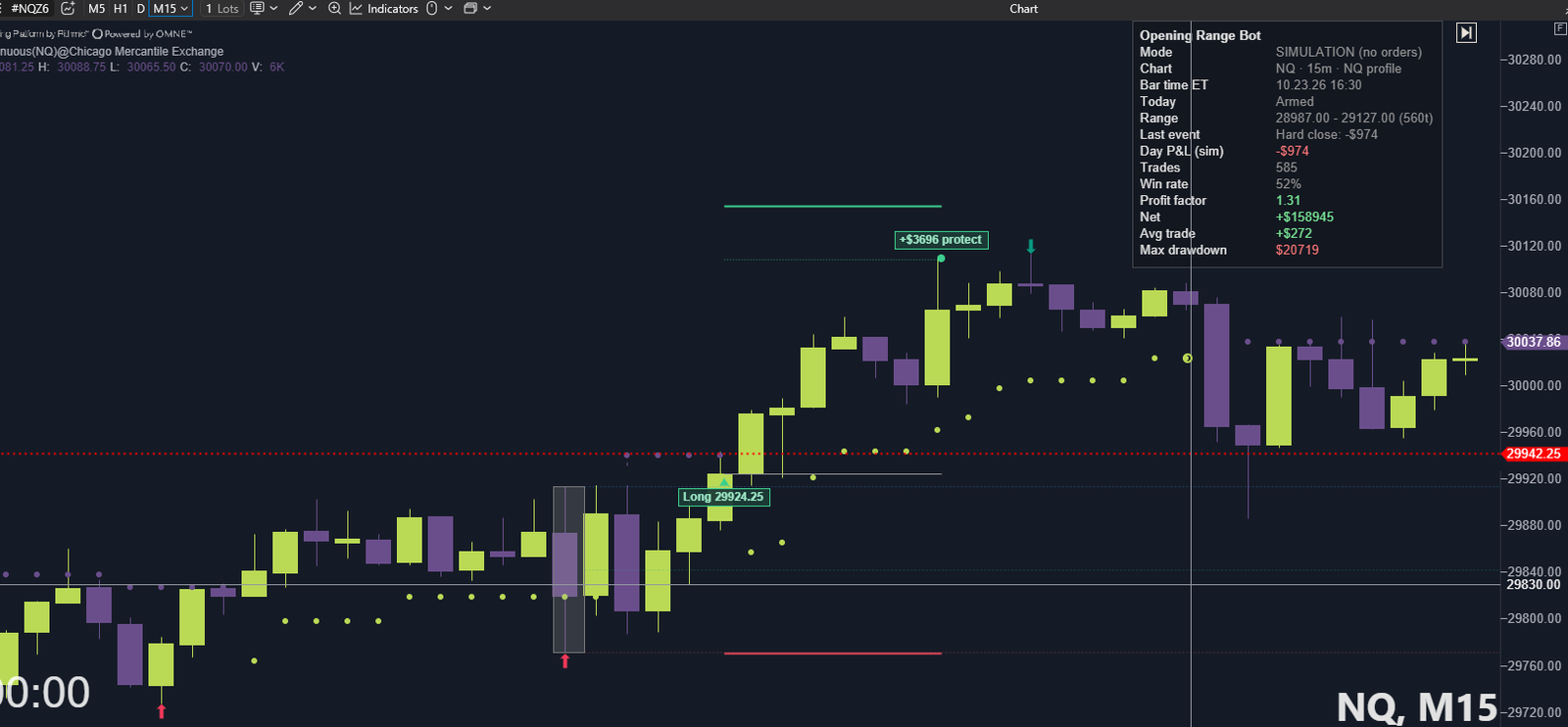
An automated opening range breakout bot for ATAS, for ES, MES, NQ and MNQ futures. It runs the same tested setup every session, places a stop and a target at your broker on every trade, and can show its own backtest on your chart before you ever turn it live.
What it does
- Trades the opening range breakout on ES, MES, NQ and MNQ, on 5- or 15-minute charts.
- Uses the validated setup for each market automatically. There are no settings to tune and nothing to optimise.
- Every live position has a stop and a target resting at your broker from the moment it opens.
- A daily loss limit pauses new entries for the rest of the day.
- Three modes: Off (the default) draws the opening range and IB lines only. Backtest replays your chart's history, draws every trade it would have taken and shows the win rate, profit factor and drawdown for every session on your chart, with no orders sent. Live sends real orders.
- In Live mode, the chart and dashboard show only your real trades: the open position, or the last trade and how it closed.
Tested before it was sold
The rules were settled on ES and then run unchanged on NQ, a market they were never built for. Two of the three years of data stayed closed during research and decided the verdict. Twenty-six variations were tested and five held up. The full results, every losing month included, are on the research page linked at the top of this page.
Recommended charts
- ES or MES: a 5-minute chart.
- NQ or MNQ: a 15-minute chart.
These are the setups the results were tested on. The bot picks the right settings for each market by itself, so there is nothing else to set. On a 5-minute NQ chart it still decides on 15-minute closes.
What you need
- ATAS on a Windows PC, with a data feed and a broker connection for live trading.
- An ES, MES, NQ or MNQ chart on 5-minute or 15-minute bars (see the recommended charts above).
- One license key per subscription. It works on one PC at a time; email us to move it to a new PC.
Subscription
$59.99 a month, billed by Stripe. Cancel, update your card or download invoices any time from the link in your welcome email. If a payment fails, your key keeps working for 3 more days while you update your card. If the license lapses, the bot takes no new trades, but an open position is still managed to its stop, target or flatten.
Questions
Should I use ATAS's own SL/TP (or a bracket template) with the bot?
No. Turn ATAS's SL/TP off on the bot's chart (set the template to none). The bot places its own stop and target at your broker on every trade. ATAS's SL/TP adds a second set of orders with its own distances: they can close the trade early, and they may stay working after the trade is over. If something outside the bot closes its trade, the bot notices within seconds, cancels its own orders and shows "Closed outside" on the dashboard. Cancel any other leftover orders yourself in ATAS's order panel.
Can I trade manually on the same instrument while the bot runs?
We don't recommend it. The bot only manages its own orders, which are tagged OpeningRange in ATAS, so a manual position or order on the same instrument and account can get in its way. Use a separate account for manual trading, or leave that instrument to the bot.
What if I close the bot's trade myself?
The bot notices it is flat, cancels its own stop and target, and counts that as one of the day's trades.
What happens if ATAS or my PC shuts down during a trade?
The stop and the target rest at your broker, so the trade stays protected. Restart ATAS as soon as you can: the bot can only close a position at the end of the session while ATAS is running.
How many trades does it take?
Only a few each day, all in the morning session, and it stops for the day once the daily loss limit is reached. Any open position is closed before the end of the session.
Do the numbers on the dashboard show today only?
In Backtest mode, "Today's P&L (backtest)" is the current session, and the Backtest row shows which sessions the totals cover: every day loaded on your chart. Load more history in ATAS to see a longer backtest.
Does Backtest mode send orders?
No. In Off and Backtest modes nothing reaches your broker and no license key is needed.
What if my internet drops?
The license is checked once a day. If the bot can't reach the server, it keeps working for up to 72 hours.
Risk disclaimer
Futures trading involves substantial risk of loss and is not suitable for every investor. You can lose more than you deposit. The bot places real orders in Live mode, and you are responsible for every order, your account settings and monitoring it. Nothing here is financial or investment advice.
Hypothetical or simulated performance results have certain limitations. Unlike an actual performance record, simulated results do not represent actual trading. Also, since the trades have not been executed, the results may have under- or over-compensated for the impact, if any, of certain market factors, such as lack of liquidity. Simulated trading programs in general are also subject to the fact that they are designed with the benefit of hindsight. No representation is being made that any account will or is likely to achieve profit or losses similar to those shown.